Most developers build websites. I build experiences.
The difference? I stopped thinking like an engineer and started thinking like a director. Every page is a scene. Every interaction is a moment. And the secret weapon behind all of it? Five prompts I feed to AI that most developers would never think to ask.
I'm going to give you all five. For free. Because I'm tired of watching people pay $2,000 for a Webflow template and call it a "brand."
Let's go.
1. "What hidden easter eggs can I embed throughout my site?"
This is the prompt that separates a website from a world.
Most sites are dead. You scroll, you read, you leave. But what if typing a word triggered a swarm of fish across the screen? What if holding a button for three seconds revealed a hidden quote? What if visiting at midnight spawned a ghost ship on the horizon?
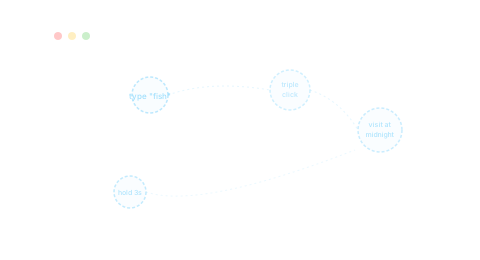
That's not made up. That's my portfolio right now.
I asked AI to come up with a whole system of hidden secrets for my site. Some trigger when you type certain words. Others only appear at certain times of day. Some need a specific click pattern. And I track all of them, so I can see exactly which ones people discover.
The result: people stay longer, share it with their friends, and actually remember the experience. One easter egg takes about 20 minutes to build. The impression it leaves? Permanent.
Try this prompt: "I have a [type of website]. Design 8-10 hidden easter eggs I can embed throughout the site. Include keyboard shortcuts, time-based events, interaction-based secrets, and at least one that rewards repeat visitors. For each, describe the trigger, the visual effect, and how long it lasts."
You're welcome.
2. "Design a 3D showcase that visually explains [topic]"
Stop writing paragraphs about what your product does. Show it.
I built a project page for my Instagram automation tool where you don't read about how it works. You watch it work. Animated bubbles connected by lines, data flowing from one step to the next, the whole system moving in 3D right in your browser. It explains more in 3 seconds than a wall of text does in 3 minutes.
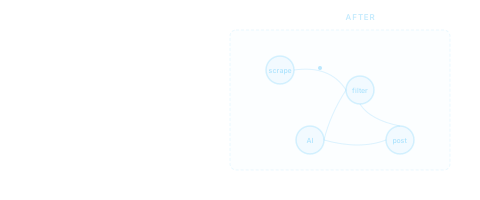
This works for literally anything. Software tools, apps, workflows, even restaurant menus. If you can explain how something works, AI can help you turn that explanation into a moving, interactive visual.
Try this prompt: "I'm building a web page for [product/project]. Instead of describing how it works with text and pictures, design an interactive 3D visualization that lets visitors SEE the system in action. Describe what the scene looks like, how things move, how the camera moves, and how clicking or scrolling reveals different steps."
Most agencies charge $15K for this. You can build it in an afternoon.
3. "Make my site aware of the real world"
Time of day, weather, location, season.
Your website should feel alive. Not like a PDF someone uploaded.
My portfolio knows what time it is. At dawn, the sky turns pink and the ocean catches golden light. At noon, everything's bright and crisp. At midnight, the portal glows cyan in the darkness and the only sound is distant waves.
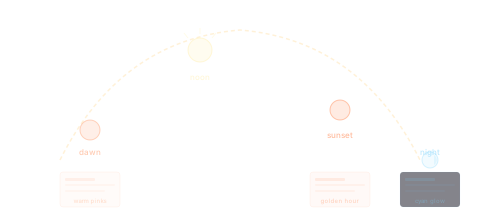
I didn't do any of this by hand. I told AI where the sun is at every hour and asked it to make everything on the page react. The water color changes. The haze gets thicker or thinner. The glowing bits get brighter at night. Even the text adjusts so you can always read it, no matter how dark or light the background gets.
It took one prompt and a few rounds of tweaking. The result is a site that looks different every time you visit.
Try this prompt: "I want my website to change based on the visitor's local time of day. Design a system where the colors, lighting, animations, and overall mood shift smoothly between dawn, day, sunset, and night. Give me specific colors and settings for each time period. The changes should blend smoothly, not jump between states."
Visitors don't know why your site feels special. They just know it does.
4. "Design micro-interactions for every clickable element"
Hover states, press feedback, sound design.
Here's what separates a $500 website from a $50,000 one: feel.
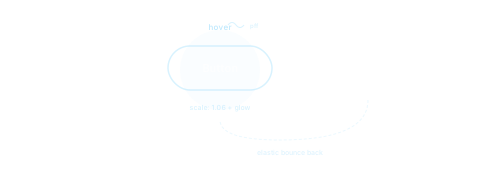
Every button on my site has three states. When you hover over it, it grows slightly bigger and a soft glow appears behind it. When you click, it squishes down like you're pressing a real button. When you let go, it bounces back like a rubber ball. There's even sound. A soft little puff when you hover. A satisfying pop when you click. All generated by code. Zero sound files.
None of this is hard to build. But almost nobody does it because they never think to ask for it.
Try this prompt: "Design a complete set of small animations for my website. For every button, link, and card, tell me: what happens when someone hovers over it (size change, glow, color shift), what happens when they click it (squish, visual feedback), what happens when they let go (bounce back), and optional sound effects generated by code. Make it feel satisfying and high-end, not cheesy."
The difference between "nice website" and "holy shit" is a handful of small animations and a few tiny sound effects.
5. "Create a loading experience that makes people want to wait"
Everyone hates loading screens. So stop building loading screens and start building loading experiences.
Mine is a spinning sphere made of words. My name, what I do, what I build with. All floating and orbiting in space while the rest of the site loads behind it. Tap the screen and ambient sound kicks in. The whole thing feels like it was meant to be there, not like an apology for being slow.

The psychology is simple: if the loading state is interesting, it doesn't feel like waiting. It feels like an introduction.
Try this prompt: "Design a loading experience for my website that's interesting enough that people don't mind waiting. It should introduce who I am, set the vibe, and smoothly fade into the real site when it's ready. Tell me what it looks like, how it moves, and how it handles both fast and slow internet. No boring progress bars."
Your loading screen is your first impression. Act like it.
The Real Secret
These prompts work because they force AI to think bigger. Most people ask for basic stuff. "Add a menu." "Make a contact page." And they get a site that looks like every other site on the internet.
The trick is asking for experiences. For moments. For the kind of thing that makes someone pull out their phone and text a friend "you have to see this website."
That's what I build. And now you have the playbook.
If you want me to build it for you, or if you want to learn how to do this yourself, more is coming. Subscribe and I'll send you the next one.